Making Ships Individually More Useful in NetSuite Integrated Shipping

NetSuite's Ships Individually setting can be surprisingly useful for warehouse operations, particularly for companies still using native integrated shipping with UPS or FedEx.

When an item is configured to Ship Individually, changing an Item Fulfillment to Packed can automatically create a package for that item and populate its weight.

That saves work. But there is a small problem. The package knows how much it weighs, but the warehouse may not know what is in it.

...
Jack Ring
Share:

Add the Item to the Package Description

We added a lightweight Client Script that watches the packing process. When NetSuite generates a package for a Ships Individually item, the script also populates Package Contents Description with information from the item.

So instead of this:
Weight: 16.5 lbs
Package Contents:

the warehouse gets something like:
Weight: 16.5 lbs
Package Contents: HR980-111-50-01 - Honda R980, Model 50, HROW

The Important Part

The important part is that we aren't replacing NetSuite's integrated shipping process. NetSuite still creates and manages the package. We're simply making the package it creates more useful. Your UPS example shows exactly what that looks like in the underlying fulfillment. NetSuite generated a UPS package containing the weight, tracking number and our populated package description.


...

The SuiteScript Idea

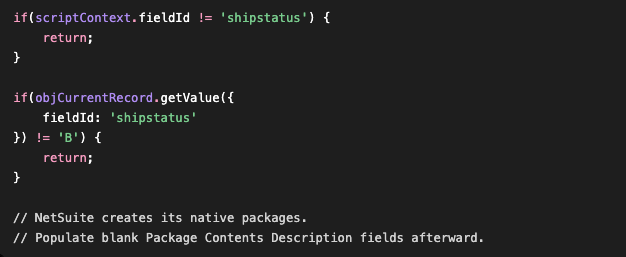
The implementation can remain pretty small. The Client Script detects the move to Packed, allows NetSuite to create its packages, and then fills blank package descriptions. For example:


...

There is one wrinkle for older integrated-shipping environments: UPS and FedEx don't necessarily expose their package information identically.

For example, our UPS fulfillment uses the packageups sublist with fields such as:
packageups
packagedescrups
packageweightups
packagetrackingnumberups

So the script determines which package structure NetSuite is using rather than assuming every fulfillment looks the same.

I'll deliberately leave the rest of that implementation as an exercise for the SuiteScript developers. The interesting part isn't the code. It's recognizing that NetSuite has already done most of the work.

Then Put It on the Packing Slip

...

Once the package contains useful information, there is another obvious opportunity.

Print it.


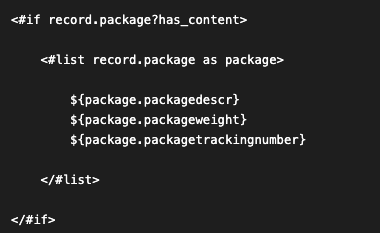
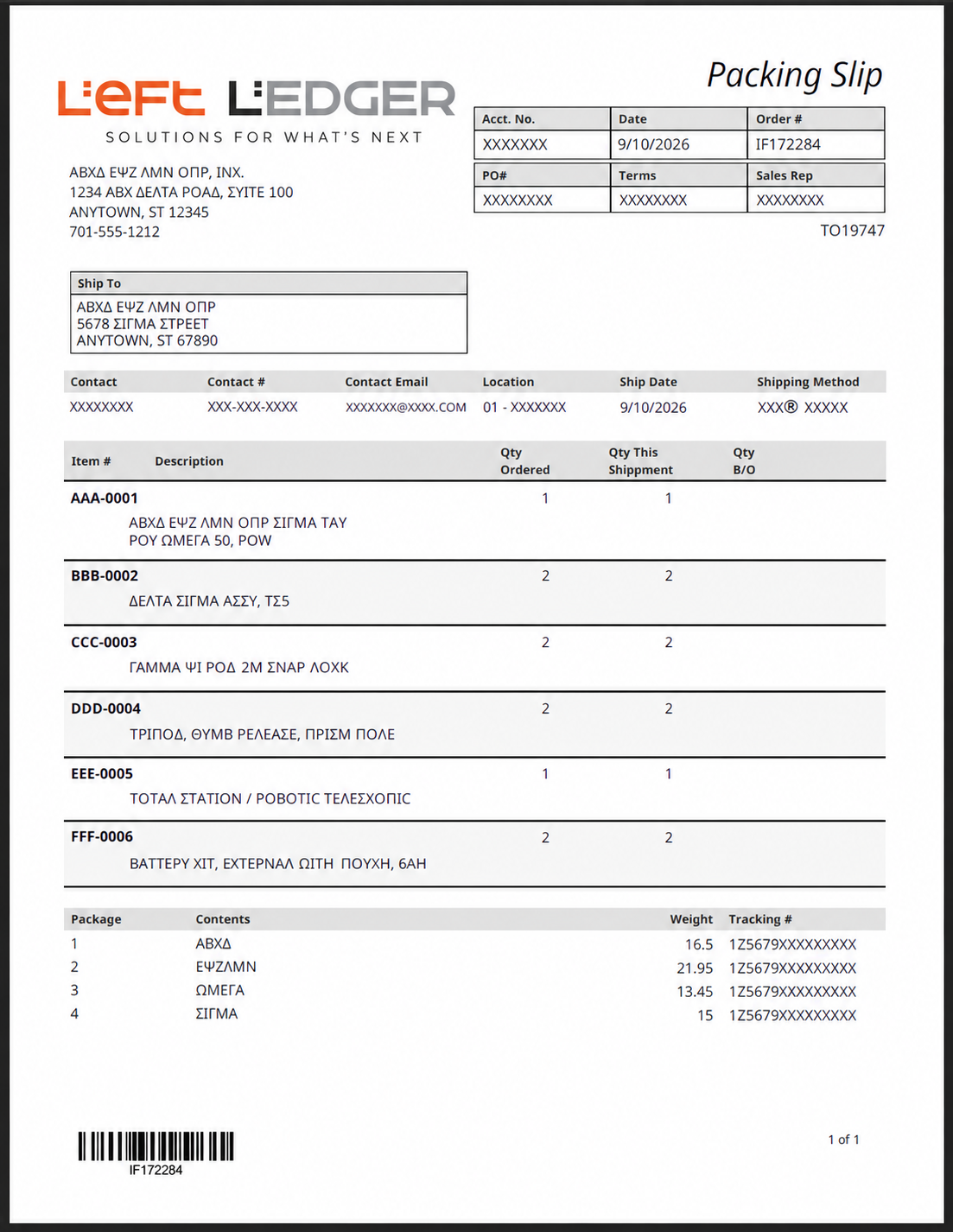
We extended the Advanced PDF Packing Slip so that, when package information exists, a simple package section appears underneath the normal item detail:
The template already had the normal shipment item section, so the package information was added immediately afterward.

Conceptually, the FreeMarker is little more than:


...

For UPS, the same idea applies using the UPS-specific package fields. The finished template can account for either structure and only display the package section when useful package information actually exists.

A Small Change With a Practical Payoff

...

This isn't a shipping-system replacement or a major warehouse project.

It simply connects three things NetSuite already knows:

Ships Individually... Package... Packing Slip

For organizations still relying on NetSuite's native integrated shipping, small improvements like this can make an older workflow considerably more useful without asking warehouse users to adopt a completely different process.

About Left Ledger

I help companies already running Oracle NetSuite, or in the midst of an implementation, regain operational clarity, financial trust and process control across the ERP environment.

Independent. No license reselling. No partner quotas. No layers of project management. Clients work directly with a NetSuite ERP soloist focused on how the system actually behaves inside day-to-day operations.

Jack Ring Left Ledger Inc. Jack@LeftLedger.com 724-816-1000


Schedule a Conversation

Let's talk. • (724) 816-1000 • info@leftledger.com


Archived Articles

...


Schedule a Conversation

Let's talk. • (724) 816-1000 • Jack@LeftLedger.com