A question about a missing Vendor Prepayment in bank reconciliation looked like a transaction problem. It turned out the transaction was working exactly as designed, while the process surrounding it had never caught up.

A user couldn't find a Vendor Prepayment while reconciling the bank account, so naturally the prepayment became the suspect. But once I recreated the entire transaction lifecycle in Sandbox, the real issue became clear.
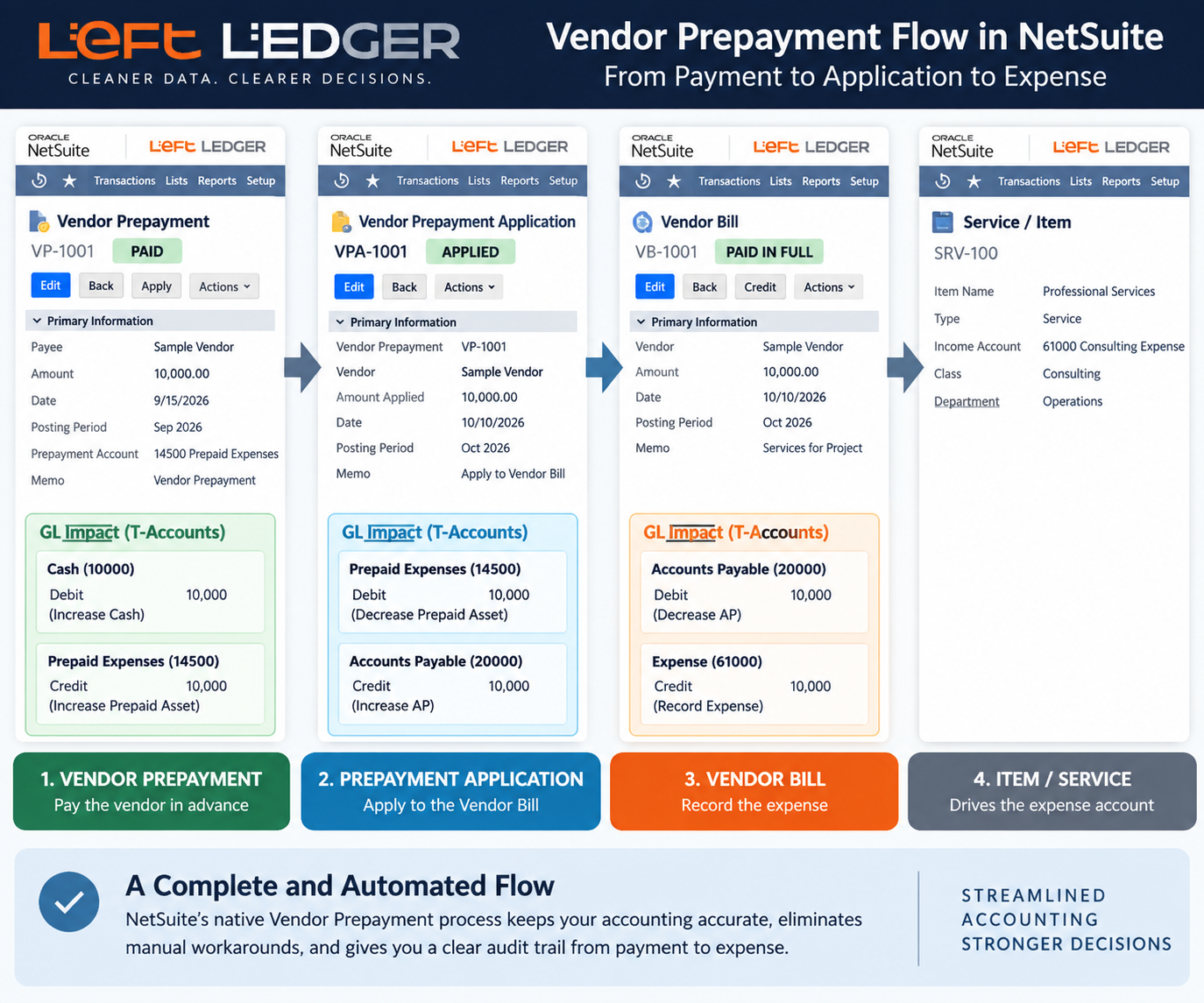
NetSuite's native Vendor Prepayment process is actually quite elegant. The payment reduces cash and establishes a prepaid asset; when the Purchase Order is eventually billed, NetSuite automatically creates the Vendor Prepayment Application and applies that asset against Accounts Payable. The Vendor Bill records the actual purchase or expense, leaving the prepayment fully accounted for without manual cleanup.
The important part is what isn't required: a collection of temporary holding accounts, Bill Credits, Bank Deposits and Journal Entries to stitch the transactions together. In fact, those workarounds can make a straightforward native process much harder to understand and reconcile.
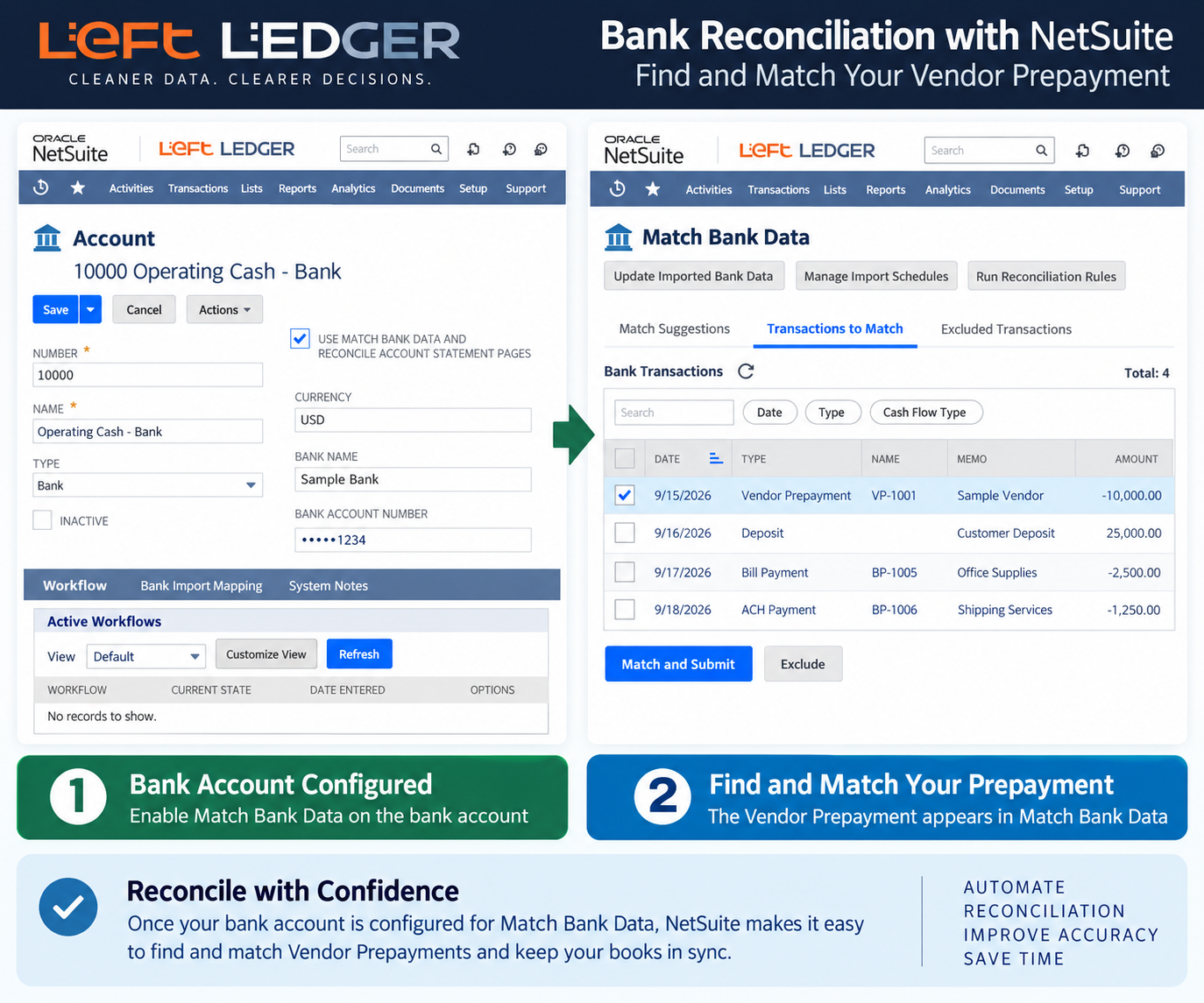
Once the accounting was proven, the original question became much easier to diagnose. The Vendor Prepayment wasn't missing at all; the bank account was still being reconciled through an older workflow rather than NetSuite's modern Match Bank Data process.
Once the bank account is configured appropriately, the Vendor Prepayment appears where it belongs and can be matched against the corresponding bank transaction. Bank matching can happen throughout the month, with the account statement reconciled at month-end.
When something appears to be missing in NetSuite, resist the temptation to immediately change the transaction, add a Journal Entry or invent another workaround.
Follow the transaction from beginning to end. Understand the GL impact. Then look at the processes surrounding it. Sometimes NetSuite isn't doing the wrong thing at all. The organization is simply using a process that no longer matches what NetSuite is capable of doing.
Most NetSuite problems are not accounting problems. They are systems problems.
Left Ledger Inc. helps companies already running Oracle NetSuite regain operational clarity, financial trust, and process control across the ERP environment.
Independent. No license reselling. No partner quotas. No layers of project management.
You work directly with a NetSuite ERP soloist focused on how the system actually behaves inside day-to-day operations.
Jack Ring
Left Ledger Inc.
724-816-1000
...
Most ERP conversations start and end with accounting. Close the books. Tie out reports. Make sure the numbers reconcile. That matters. It has to. But it is not the full picture. I work at the intersection of finance, operations, and system behavior. I came up through STEM and hard science, and that shaped how I think about complex systems. That lens carries into every NetSuite environment I step into.
This article demonstrates how to create an elegant message banner across the top of the estimate form. This will display when there is an informative note about a customer. Another application may be used to trigger a banner to show when there is a past due amount.
This design pattern utilizes a client script, the SuiteScript message module and a custom body field on the customer record.
This article will be relevant for you if your company is using NetSuite ERP, uses standard inventory items and a new business requirement arises where you now need the functionality of Serialized or Matrix for an existing item.